
The IDE for Pine Script and Pyne

Step through it bar by bar

Write your strategy in Pine or Python and step through it bar by bar on a real chart.

1,353/1,353 outputs from 1,000 TradingView scripts match. See the proof

PyneIDE: stepping through a Pine strategy

Once Upon a Pine

Once upon a time, in the depths of the Forest of Bits, during the Age of Code, there lived a language. A secret, yet magical tongue, which could only be summoned from a single tower. There, the arcane coders forged their patterns, conjuring the spirits of price and time — and every spark born of this language was bound to that place.
But one day... the story continues…
What We Do

PyneSys is made of three parts. You can use them together or one at a time.

PyneIDE

The editor for Pine Script and Pyne in VS Code, with a debugger and a live chart.

See PyneIDE →

PyneComp

Turns your Pine Script into Pyne code. A deterministic compiler, no AI.

The compiler →

PyneCore

The open-source engine (Apache-2.0) that runs Pyne code on your machine or your server.

pynecore.org →

Write It, Run It, Debug It

PyneIDE is a free extension for VS Code. It works on your own files, runs your scripts locally on the open-source PyneCore runtime, and has no automatic telemetry.

Write Pine or Pyne in VS Code

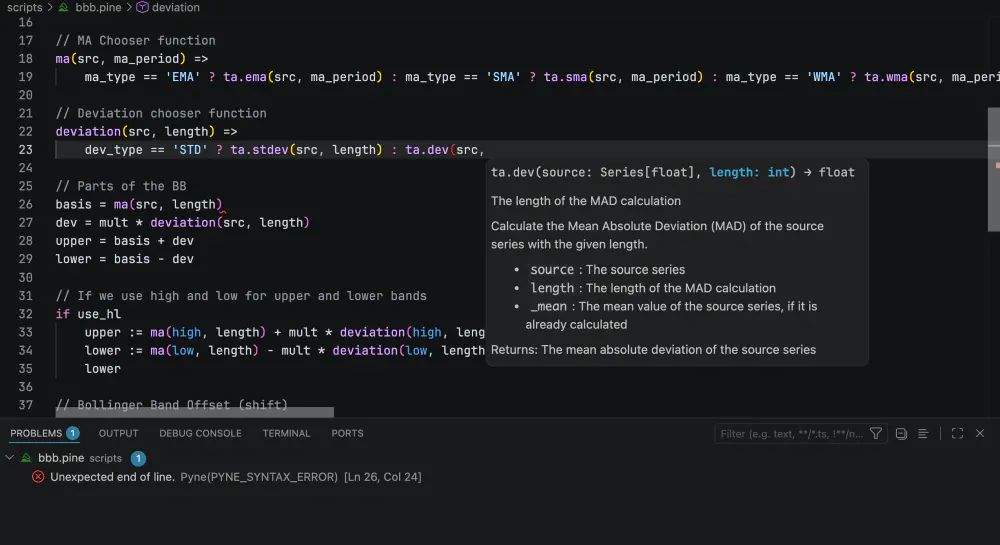
Open a .pine file and PyneIDE checks it as you type, with completion, hover docs and inline errors from its own Pine language server. Files marked @pyne open as Pyne code with analysis that understands series history and na.

Pine Script signature help and inline diagnostics in PyneIDE

Run It on a Real Chart

Press Run above the first line. The script compiles, runs on your machine and streams onto a candlestick chart with its plots, drawings and strategy results.

Step Through It Bar by Bar

Set a breakpoint in your .pine file, then go to the next bar or run to a bar. You can also pick a bar on the chart and the run stops there. You step in Pine terms, with your own variable names. TradingView has no step-through debugger for Pine.

Change Inputs Without Editing the Code

Every input.*() call becomes a form field. Save the form and the chart runs again. The values go into a .toml file next to the script, so your source stays exactly as you wrote it.

Install PyneIDE
Free for Pyne code, no account needed

Compiling Pine Script needs a PyneSys API key from one of the plans.

Its Own Language, and It's Python

Pyne is its own language, and every Pyne file is a Python file. Pyne code runs on standard CPython 3.11 or newer, so you can import any Python library and call your indicators from the Python code you already have.

  • Use pandas, NumPy or your own model inside an indicator.
  • Import a Pyne module from other Python code. The Freqtrade example puts Pine indicators into a Freqtrade strategy.
  • Keep it in git and test it with pytest, like the rest of your Python.
  • PyneCore adds Pine's bar-by-bar memory when the file is imported. What PyneCore does to your Python shows how.

Already have Pine Script? The compiler turns it into Pyne code.

"""
@pyne
"""
from pynecore.lib import script, close, ta, plot, color, input

@script.indicator(title="Bollinger Bands")
def main(
    length=input.int(20, "Length", minval=1),
    mult=input.float(2.0, "Multiplier", minval=0.1, step=0.1),
    src=input.source(close, "Source")
):
    basis = ta.sma(src, length)
    dev = mult * ta.stdev(src, length)

    plot(basis, "Basis", color=color.orange)
    plot(basis + dev, "Upper", color=color.blue)
    plot(basis - dev, "Lower", color=color.blue)

Proof, Not Promises

Don't take our word for it. Pyne in the Wild takes the most popular open-source Pine Script indicators and strategies published on TradingView, compiles each one to Python, and runs it with PyneCore. Wherever TradingView's output can be exported, every plotted value and every trade is compared against it — bar by bar, bit by bit.

The remaining 0.229% of bars? Within 1e-9 relative tolerance — last-digit floating-point rounding, documented per script, because “close enough” deserves a number too. Every result is reproducible: the corpus pins the exact source of each script with a SHA-256 hash.

Browse the Full Report

Script-by-script results at wild.pynesys.io · snapshot 2026-10-24 · the corpus keeps growing

1,000
real TradingView scripts
502 indicators, 498 strategies
100%
compile and run
1,000/1,000, zero failures
99.771%
of 132 million compared bars
bit-exact vs TradingView
0
scripts diverge from TradingView
across 353,577 compared trades

What Our Community Says

Unfiltered messages from our Discord — typos and all.

We didn't ask anyone for a review. These are working conversations, verbatim — praise, bug reports, and everything in between.

Join the conversation →
# community-feedback
M
M•••• 2025-08-05 22:00
Perfect :) Thank you so much for your efforts, you're really helping us all! (edited)
❤️ 1
@e• hey @PyneSys , I was wondering if i could convert very long and complex pinescript codes that have 400+ lines of code into a working python script ready to be displayed on my own backtest module
A
A•••• 2025-08-07 13:10
I had converted 1208 line of pinescript into industrial grade python script. So definitely possible
👍 2
@PyneSys Not yet – right now PyneCore is designed for running scripts on historical data...
a
a•••• 2025-08-22 11:46
Thanks! Awesome product! (edited)
❤️ 1
s
s•••• 2025-08-23 07:45
I am so happy to be here... and knowing that others are thinking out of the box regarding pinescript.
s
s•••• 2025-08-23 13:14
nice job... this is a good projet... because TV has too much restrictions!!
❤️ 1
@l••• this thing is useless
M
M•••• 2025-09-26 19:49
No it's not.
k
k•••• 2026-04-21 17:46
oh my gosh this project is so damn cool
like no joke ive been coding pinescript for over a year now but i have no idea how backtesting in python works
this is exactly what i needed
❤️ 1
k
k•••• 2026-04-21 18:04
i found it
s
s•••• 2026-05-06 04:06
this project is seriously so cool
i really enjoy coding in pinescript, so it's awesome to find something like this
❤️ 1
•
M•••• 1:04
That's actually crazy! Thank you so much for putting your work into this project! My automatic trading bot is ready and works flawlessly and without your project i would likely still struggle to somehow get my indicator values from live data... so i really appreciate it!
❤️ 1

Real messages from our Discord community. Usernames anonymized for privacy.

Pricing Plans

Pyne code is free. The plans pay for compiling Pine Script, in PyneIDE, from the CLI or through the API.

Free Pyne code

Write, run and debug Pyne code in PyneIDE on your own machine, on the open-source PyneCore runtime. No account and no API key.

Install PyneIDE

Bring your Pine over

Convert a few scripts, then keep working on the Pyne code for free.

🌱 Seed

$8 / month

For bringing one or two Pine indicators over to Pyne. Convert them here and keep working on the Pyne code in PyneIDE, where running and debugging it is free.

  • 5 script conversions per day
  • 1 script conversion per hour
  • 1 API key

🌿 Sprout

$18 / month

For converting Pine scripts regularly. Each conversion gives you Pyne code that you can edit, run and debug in PyneIDE for free.

  • 30 script conversions per day
  • 5 script conversions per hour
  • 2 API keys

Keep developing in Pine

For running and debugging Pine Script in PyneIDE every day.

🌲 Grower

$28 / month

For writing Pine Script every day in PyneIDE. The IDE recompiles your script each time you run it after an edit, so this plan allows 60 compiles an hour.

  • 100 script conversions per day
  • 60 script conversions per hour
  • 5 API keys

🌳 Forest

$48 / month

For teams, freelancers and platforms that compile Pine Script in volume.

  • 300 script conversions per day
  • 120 script conversions per hour
  • 10 API keys

Plan Comparison

SeedSproutGrowerForest
Price$8$18$28$48
Pine compiles per day530100300
Pine compiles per hour1560120
API Keys12510
Max Script Size25 KB50 KB150 KB300 KB
  • Each run of a changed .pine file is one compile. Unchanged scripts come from the cache and don't count.
  • Converting a Pine v4 or v5 script to v6 doesn't use your quota.
  • The generated Pyne code is yours to read, edit and keep.

Most scripts convert 1:1 and run as-is. When one doesn't, the generated Python is readable, so a small manual edit usually gets it working. See the FAQ and the PyneCore Compatibility page for details.

Platform integration or commercial licensing? Get in touch →

Data Handling & Security

Script Privacy

We only cache your scripts for conversion purposes. They are never shared with third parties without your permission.

User Data

User account management is handled securely through Logto authentication.

Payment Security

All payment processing is handled by Stripe with bank-level security standards.

API Security

API keys can be revoked at any time. All connections are secured with HTTPS.

Join Our Community

Connect with other traders, developers, and the PyneSys team.

Trading Myth Busting

We take a strategy from a popular trading video, write its rules as code and test them on several markets, before and after costs. Each episode is a video and an article with the script and the results.

Frequently Asked Questions

No. Keep charting and publishing on TradingView, and develop your scripts in PyneIDE. There they are files in your own git repository, and you can step through them bar by bar in a debugger, which TradingView doesn't have.

Yes for Pyne code: writing, running and debugging it needs no account and no API key. Pine Script files are compiled by the PyneSys cloud compiler, which needs an API key from one of the plans. Unchanged scripts come from the cache and don't use your quota, and neither does converting a v4 or v5 script to v6.

Yes. Pyne is its own language for indicators and strategies, and every Pyne file is a Python file that runs on standard CPython 3.11 or newer, so you can import any Python library. PyneCore adds Pine's bar-by-bar semantics when the file is imported; What PyneCore does to your Python explains how.

For PyneIDE, only VS Code and the extension. PyneIDE downloads its own Python and the PyneCore runtime the first time you need them, so you don't need a system Python.

Without the IDE, you can use the compiler through the web app, the PyneCore CLI or the HTTP API. The CLI calls the API and only converts a script that isn't in the cache yet.

Pine Script is TradingView's programming language. We're not copying or reverse-engineering it, but building an independent system that is functionally compatible with it. This means the same logic and behavior applies, but in Python language, with full control and customizability.