
Pine Script® → Python
in Seconds
Your Pine Script code, running in Python
This is not another AI / LLM based Pine Script converter.
Instead, it's a deterministic,
reliable compiler!
1,000/1,000 real TradingView scripts compile & run — see the proof
How It Works
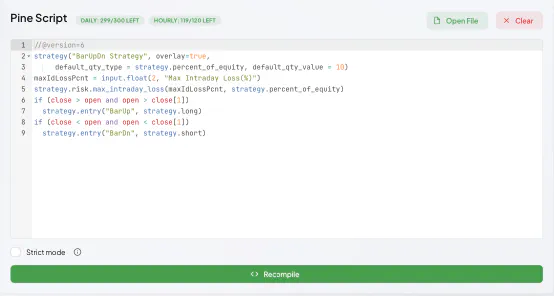
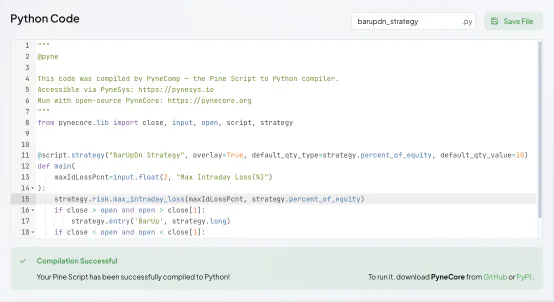
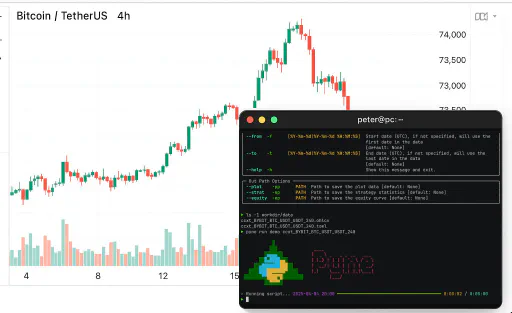
Proof, Not Promises
Don't take our word for it. Pyne in the Wild takes the most popular open-source Pine Script indicators and strategies published on TradingView, compiles each one to Python, and runs it with PyneCore. Wherever TradingView's output can be exported, every plotted value and every trade is compared against it — bar by bar, bit by bit.
The remaining 0.229% of bars? Within 1e-9 relative tolerance — last-digit floating-point rounding, documented per script, because “close enough” deserves a number too. Every result is reproducible: the corpus pins the exact source of each script with a SHA-256 hash.
Browse the Full ReportScript-by-script results at wild.pynesys.io · snapshot 2026-10-13 · the corpus keeps growing
502 indicators, 498 strategies
1,000/1,000, zero failures
bit-exact vs TradingView
across 353,577 compared trades
Try It For Free
Not ready to subscribe yet?
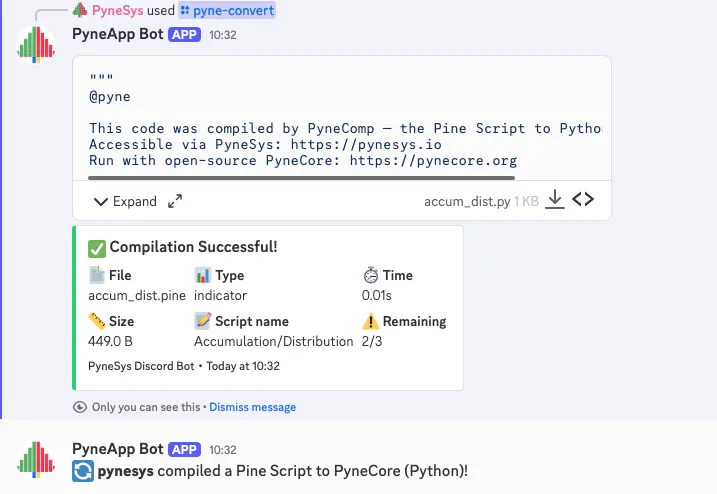
Convert up to 3 scripts for free with our Discord bot.
Go to #pine-compiler-bot channel in PyneSys Discord Server and use the /pyne-help command.
Discord bot conversions support Pine Script v4, v5, and v6 files up to 25KB.
Join Our Discord3 free conversions
CLI & API Integration
The PyneCore CLI is the primary interface today — run your Pine Scripts locally with a single command. For backend automation, the same compiler is exposed as an HTTP API. Pick whichever fits your workflow; both call the same deterministic compiler.
PyneCore CLI
# One-shot: compile via the API, then run locally on your OHLCV data
pyne run my_strategy.pine BTCUSDT_1D.ohlcv

# Or compile only — produces a .py file you can edit and commit
pyne compile my_strategy.pine
The CLI re-compiles only when the .pine file is newer than its generated
.py, so unchanged scripts never hit the API. Set your key once via
PYNESYS_API_KEY, the --api-key flag, or
workdir/config/api.toml.
HTTP API
# POST a Pine Script — get readable PyneCore Python back as plain text
curl -X POST https://api.pynesys.io/compiler/compile \
  -H "Authorization: Bearer $PYNESYS_API_KEY" \
  -F "script=@my_strategy.pine"
POST /compiler/compile returns the compiled Python directly. Identical scripts are
served from the server-side cache instantly and do not consume your compile quota. Full
interactive reference at
api.pynesys.io/docs.
Key Features
- Personal Bearer API keys — create, rotate, or revoke any time from your dashboard
- Smart server-side cache — re-compiling the same Pine Script returns instantly and does not bill your quota
- Mtime-aware CLI — skips the API entirely when your
.pinesource hasn't changed - Output is human-readable PyneCore Python — read it, edit it, version-control it
- Interactive OpenAPI reference at
api.pynesys.io/docs
Join Our Community
Connect with other traders, developers, and the PyneSys team.


Frequently Asked Questions
No. Keep charting and publishing on TradingView, and develop your scripts in PyneIDE. There they are files in your own git repository, and you can step through them bar by bar in a debugger, which TradingView doesn't have.
It automatically transforms your Pine Script code into Python-compatible "Pyne" code. This Pyne code can be run in an open-source system called PyneCore, which preserves Pine semantics but in Python form.
Classic compiler! We don't use any LLM/GPT-based generation, only deterministic transformation rules (full lexical parser → AST → transform → codegen pipeline). This ensures reliable, predictable conversion results every time.
For PyneIDE, only VS Code and the extension. PyneIDE downloads its own Python and the PyneCore runtime the first time you need them, so you don't need a system Python.
Without the IDE, you can use the compiler through the web app, the PyneCore CLI or the HTTP API. The CLI calls the API and only converts a script that isn't in the cache yet.
With the PyneCore system, it can run on any platform: Linux, macOS, Windows. The system requires Python 3.11+ and doesn't use cumbersome external dependencies.
Pine Script is TradingView's programming language. We're not copying or reverse-engineering it, but building an independent system that is functionally compatible with it. This means the same logic and behavior applies, but in Python language, with full control and customizability.
Almost always. Of the 1,000 published TradingView scripts in Pyne in the Wild, 1,000 convert as they are, and 1,353 of the 1,353 outputs that can be compared with TradingView match it: plots bar by bar, strategies trade by trade.
If a script still misbehaves, the generated Python is human-readable, and the Compatibility page shows the status of every Pine Script feature in PyneCore.
Found a bug or a missing feature? Please flag it on Discord or GitHub — that's the fastest way to get it fixed.
PyneSys currently supports Pine Script v4, v5, and v6. Pine v4 and v5 scripts are upgraded automatically by our built-in converter before being converted to Python. For scripts older than v4, PyneSys still tries to interpret and upgrade them as v4. This works well in most cases, but it is best-effort and not guaranteed. In rare edge cases, automatic upgrade may not be possible, and the script logic needs to be adjusted manually to be v6-compatible before Python conversion.